
Themes
A theme sets the accent color the whole interface is built from: buttons, highlights, badges and every other colored detail. It does not change light and dark, which is a separate control.
Switch under the gear → Appearance → Color Theme.
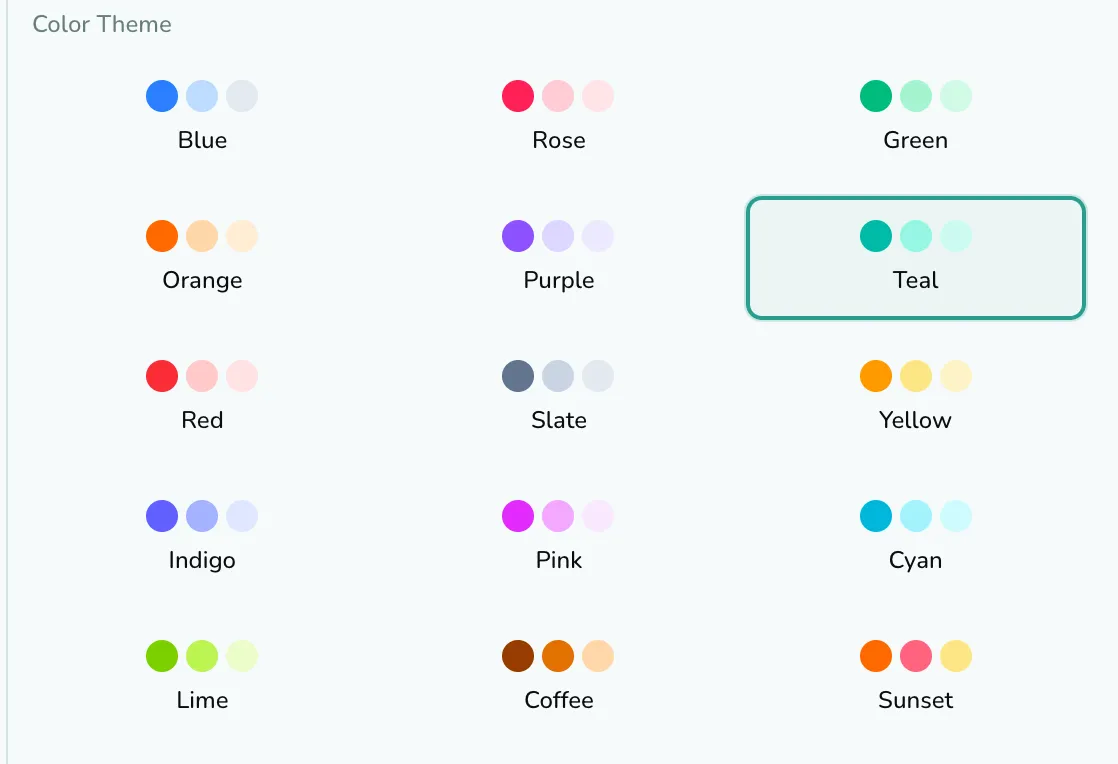
The fifteen
Section titled “The fifteen”Each is three swatches and a name. Reading the grid left to right, top to bottom:
Blue · Rose · Green · Orange · Purple · Teal · Red · Slate · Yellow · Indigo · Pink · Cyan · Lime · Coffee · Sunset
Blue is the default and the one the Free plan gets. The other fourteen carry a small padlock until you have Pro, and clicking one opens the upgrade dialog rather than applying it. The theme you are on has a colored border and ring around it.
Coffee and Sunset are the two that are not a single hue: Coffee runs dark brown through amber, and Sunset mixes orange, rose and amber. Everything else is what its name says.
Light and dark are separate
Section titled “Light and dark are separate”The sun/moon button in the header offers Light, Dark and System, and that choice is independent of the color theme. All fifteen themes are built for both, so picking Coffee does not commit you to a dark board. System follows your operating system, so the board changes with it during the day.
A theme is one setting for the whole extension, not one per profile. Switching profiles does not switch theme.
It applies everywhere TabOasis draws: the board, the popup, the side panel and the Spotlight overlay, including the overlay when it opens on top of somebody else’s website.
Your theme travels with Server Sync, like your view mode, font and Pomodoro settings. The device-local ones (language, Spotlight on web pages, notifications) stay put.