
Profiles
A profile is a whole board of its own: its own columns, its own cards, its own folders, its own tags. Switching profile swaps all of that at once. You might keep work and personal apart, or have one per client, or one per course.
Free plans get one profile. Pro gets up to ten.
The switcher
Section titled “The switcher”The control is in the board header: an avatar, the profile name, and a chevron. The count in the corner of the menu (2/10) is how many you have against how many your plan allows.
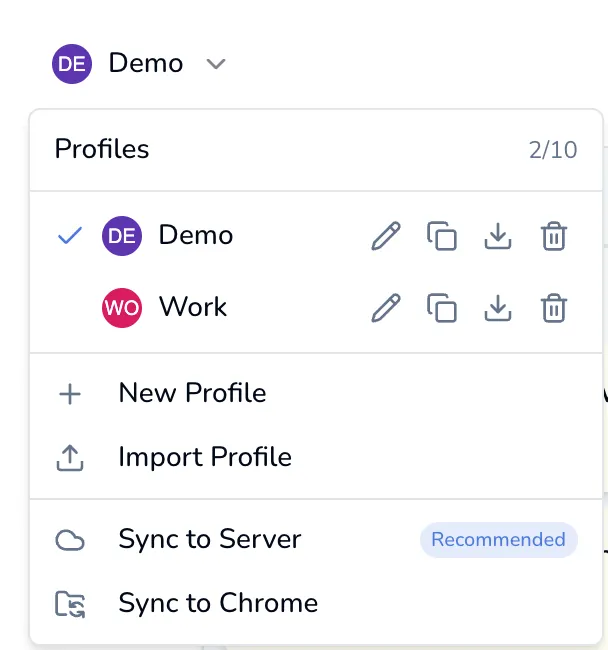
Click a name to switch to it. The four small icons on each row, left to right:
| Icon | Does |
|---|---|
| Pencil | Rename the profile |
| Two squares | Duplicate it, contents and all, under a new name |
| Down arrow | Export it to a .json file |
| Bin | Delete it permanently |
The bin is hidden when you only have one profile: there is always at least one, and the last one cannot be deleted.
Below the list: New Profile, Import Profile, and the two sync actions covered in Cloud sync. On a Free plan the sync rows carry a padlock and open the upgrade dialog instead.
Giving a profile a face
Section titled “Giving a profile a face”Each profile can have an avatar. Without one you get its initials on a colored circle, which is enough to tell two apart at a glance. Avatars are cropped to a small circle and stored with the profile, so they travel with a server sync and a profile export. They do not travel with a Chrome Sync.
What a profile does not separate
Section titled “What a profile does not separate”These are one set, shared by every profile:
- Every setting: theme, font, view mode, notification toggles, Pomodoro lengths, which views are enabled.
- All of Focus mode: sticky notes, session history, backgrounds, the ambient mix and the music playlist.
- Your AI provider, key and model.
- Your account and license.
Switching profile changes the board and nothing else.
What only sees the active profile
Section titled “What only sees the active profile”- The popup and the side panel.
- The omnibox.
- Spotlight and AI search.
- Export JSON and Export to Markdown.
There is no cross-profile search. If you cannot find something, check which profile you are in before you conclude it is gone.
Deleting one
Section titled “Deleting one”Deleting a profile permanently removes it and everything in it: bookmarks, tasks, notes, folders and tags. There is no archive for profiles and no undo. The dialog says so. Export it first if you are unsure.